Apple Watch Workout Tracker for Strength Training
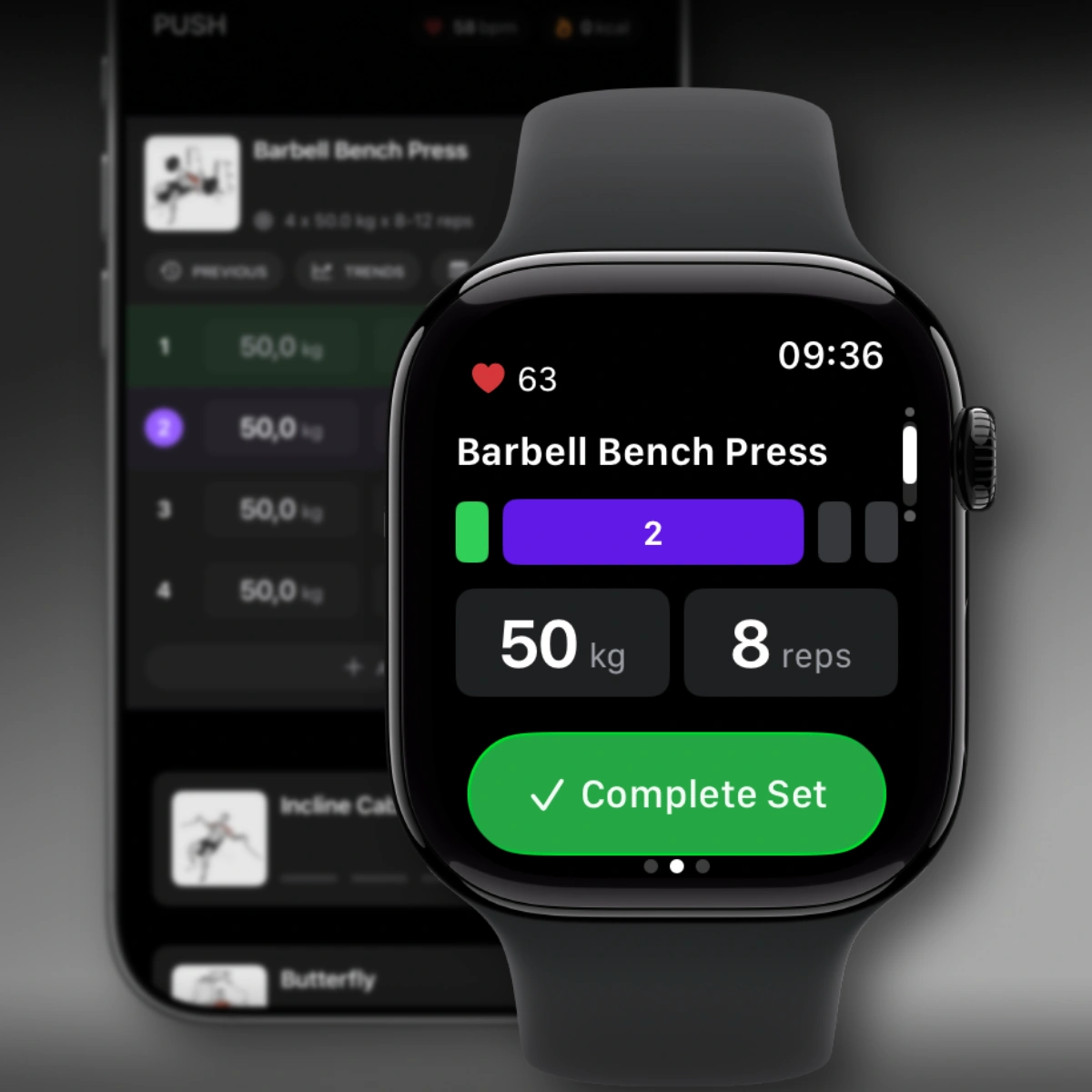
If you want an Apple Watch workout tracker for strength training, Steady pairs a focused Watch companion with a full iPhone gym log. Start the workout on iPhone, then use Apple Watch to log sets, check your rest timer, see heart rate, and keep your phone out of the main flow between sets.
The result is a practical workout tracker for Apple Watch and iPhone: the Watch keeps the session within reach, while the iPhone app manages the deeper routine structure, history, progression, and review tools that serious lifting still needs.
Built for strength training, not just workout recording
Apple Watch can record a generic workout, but lifters usually need more than duration and calories. They need exercise-level sets, reps, targets, history, rest timing, and a way to keep the session moving without breaking focus.
Steady’s Watch app is designed around that gym workflow:
- Log sets from your wrist during a strength session
- Adjust target weight, reps, or duration before saving a set
- Keep the rest timer visible when you need to recover
- Check heart rate and calories while the workout runs
- Move through the session without turning the Watch into a cluttered dashboard
For broader lifting context, see the Strength Training App page. For fast set-by-set logging, see the Gym Log App page.
What the Watch app does during your workout
The main screen of the Steady Watch app shows the current exercise, your set count, and your target weight and reps (or duration for timed exercises). When the rest timer is active, it takes over the screen with a large countdown — tap it to add time, reduce it, or skip the rest entirely.
Before marking a set complete, you can adjust what you actually performed by tapping the target value and changing it with the Digital Crown or a swipe. When you’re ready to log: tap the button, or use double tap — pinch your index finger and thumb together twice on the hand wearing the Watch. No screen interaction needed.
Swipe around the main screen to access elapsed time, heart rate, and calories burned (above); pause and resume controls (left); the next exercise in your workout (below); and music controls for both Watch and iPhone (right).
That makes Steady a strong fit if you are searching for an Apple Watch gym tracker, Apple Watch gym log app, or Apple Watch app to log sets and reps.
Rest timer and recovery on your wrist
Rest timing matters in strength training. A heavy set often depends on whether you actually recovered enough before starting the next one.
With Steady on Apple Watch, the rest timer can take over the screen with a clear countdown. You can add time, reduce time, or skip the rest without digging through the iPhone app. The Smart Stack rest-timer glance also keeps the countdown easy to check from your wrist.
Heart rate and calorie tracking
When you pair Steady with Apple Watch, workouts are tracked as proper Apple Health sessions — which means accurate calorie data and real-time heart rate, visible both on the Watch and on the iPhone workout screen.
Heart rate during rest is a surprisingly useful signal. Glancing at it before starting the next set gives you a concrete read on whether your body has recovered — especially helpful on heavy compound movements where that extra minute of rest can make a real difference.
If Apple Health integration is your main priority, visit the Apple Health Workout Tracker page.
A companion, not a replacement
The Watch app is designed to work alongside the iPhone app, not replace it. Your iPhone stays with you in the gym — the Watch extends what it can do. Think of it as reducing the moments where you need to physically interact with your phone, without changing the core training workflow you already rely on.
To unlock heart rate tracking and calorie data, grant Apple Health access on both devices when prompted. The app requires watchOS 26 paired with iOS 26, and installs automatically with Steady 2.6.
This companion model also keeps Steady focused. You still get workout history, personal records, progression tools, and review on iPhone, while Apple Watch handles the moments where wrist access is faster. If you want an Apple Watch workout tracker without social features, Steady stays out of the feed loop and points the Watch at one thing: the set in front of you.
Download Steady free on the App Store and keep your workout within reach.
Related pages
- Apple Health Workout Tracker
- Gym Log App
- Strength Training App
- Progressive Overload App
- Workout Tracker Without Social Features
FAQ
Does Steady have an Apple Watch app?
Yes. Steady 2.6 introduced a native Apple Watch companion app. It opens automatically when a workout starts on iPhone and gives you set logging, rest timer control, heart rate, and music controls from your wrist.
Can I use Steady on Apple Watch without my iPhone?
No. The Watch app is a companion — your iPhone needs to be with you in the gym. The Watch acts as a second screen, not a standalone tracker.
Can Apple Watch track sets and reps with Steady?
Yes. Steady lets you log sets from Apple Watch, adjust target weight or reps with the Digital Crown, and keep the full workout history organized in the iPhone app.
What is the double tap gesture?
Double tap is an Apple Watch gesture: pinch your index finger and thumb together twice on the hand wearing the Watch. In Steady, it completes the current set — a hands-free way to log without touching any screen.
Does the Watch app track calories and heart rate?
Yes. When paired with Apple Watch, Steady starts a proper Apple Health workout session, enabling real-time heart rate and accurate calorie tracking — displayed on both the Watch and the iPhone workout screen.