How to Find Exercises You've Logged Before

The fastest way to find exercises you’ve logged before is to filter your exercise library by past performance, then narrow the familiar list by muscle, equipment, or search. That is especially useful when you remember doing a movement but not its exact name, or when you want a repeatable session without scrolling through every option in the library.
Knowing which exercises you have actually used is more useful than having an endless list of possible exercises. Familiar movements come with context: you know how they feel, what equipment they need, and what your recent numbers looked like. That makes the next choice calmer and more deliberate.
When a familiar-exercise filter helps
This kind of filter is most useful in a few common gym moments:
- You are rebuilding a routine after time away and want movements you already know.
- A station is taken and you need a familiar alternative, not a random replacement.
- You remember training a muscle with a cable or machine but cannot remember the exercise name.
- You want to keep a lift in rotation long enough to compare performance honestly.
- Your exercise library has grown large enough that browsing everything slows down the start of a workout.
It is not a rule that every exercise must have a history. New movements can be worth trying. The point is to make prior experience easy to find when it is the right place to start.
Why familiar exercises make tracking clearer
Progress is easier to read when the movement stays reasonably stable. If you do a chest-supported row for several weeks, changes in reps, load, control, and effort have some continuity. If you switch between three similar rows every session, the numbers are harder to compare.
That does not mean you should never change exercises. It means a change should have a reason: different equipment, a better fit for your body, a new training emphasis, or a practical substitution. When you do swap a movement, your past list gives you a short, relevant starting point instead of a blank slate.
 Your history is most useful when it helps you make the next choice, not when it becomes another screen to study for ten minutes.
For a simple process, keep the main movements you want to progress in your routine, then use familiar alternatives when the gym setup, your joints, or the day calls for one. Our guide to planning exercise substitutions can help you decide which swaps are close enough to preserve the intent of the session.
How to use the Performed filter in Steady
Steady’s Exercises tab includes a type filter called Performed. It shows only movements you have logged at least once, so it cuts the library down to exercises with real training history.
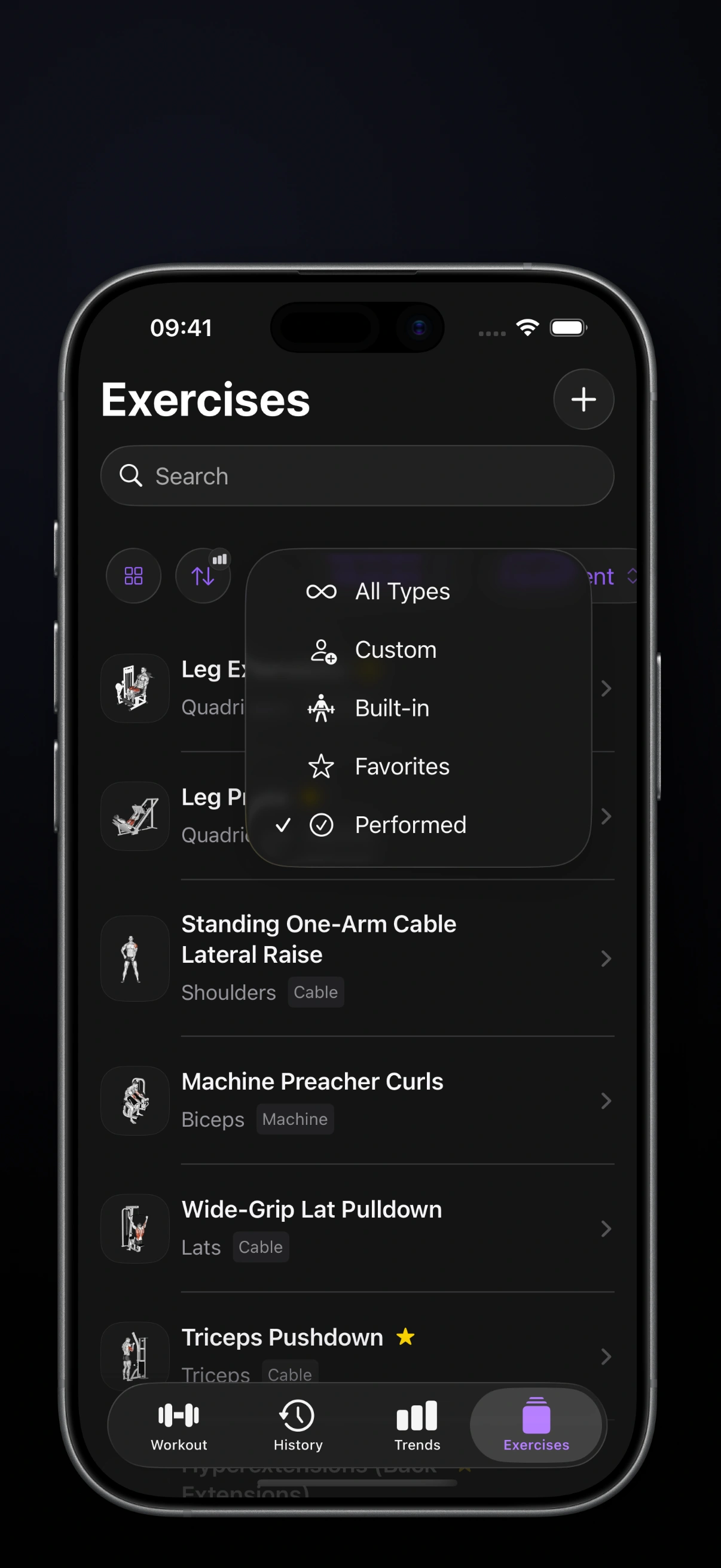 The Performed option sits alongside All Types, Custom, Built-in, and Favorites in the exercise type menu.
Use it like this:
- Open Exercises in Steady.
- Tap the type-filter control near the top of the list.
- Choose Performed.
- Add a muscle or equipment filter when you want to narrow the results further.
- Search within that smaller list if you remember part of the exercise name.
The filter works with your recorded exercise stats, not just a list you marked as a favorite. That distinction matters: a favorite can be something you intend to try, while Performed is a record that you have actually used the movement in a workout.
Use history as a starting point, not an autopilot button
The Performed list answers one question well: “What have I trained before?” It does not answer every programming question for you.
Before adding a familiar exercise, check whether it still fits today’s goal. A movement you used during a high-volume block may not be the best choice for a short maintenance session. A lift that worked with one setup may need a different load or range of motion now. Past performance gives you evidence; it does not remove judgment.
A useful quick check is:
- Does this exercise train the muscle or pattern I need today?
- Is the equipment available and comfortable to use?
- Can I compare it fairly with recent sessions?
- Do I know why I am choosing it instead of another familiar option?
If the answer is mostly yes, use the history. If not, choose the better movement and log the reason in a short note. That is how a tracker becomes useful context rather than a set of rules.
Common mistakes
Treating every old exercise as a good current choice
An exercise can be familiar and still be wrong for the session. Keep the training goal first; use the filter to reduce searching, not to outsource the decision.
Confusing familiar with identical
Two cable rows may look similar but feel very different because of the handle, angle, seat position, or range of motion. If you want meaningful comparisons, keep those details consistent enough to know what the numbers represent.
Replacing core lifts too often
If your priority is strength or progressive overload, give your main lifts enough consecutive exposures to show a trend. Use the Performed filter to rediscover alternatives, but do not let novelty interrupt a movement that is working.
Keep the next choice simple
The best exercise library is not the biggest one. It is the one that helps you find a good movement quickly, train with intent, and recognize what changed next time.
Steady keeps exercise history, focused filtering, routines, and workout logging close together without turning the gym into a feed or a crowded workout store. Use the Performed filter when familiar work is the right call, then let your actual sessions—not memory alone—guide the next decision.
Ready to start applying progressive overload?
Ditch the spreadsheets and complex notes. Join thousands of lifters who use Steady to focus on the workout, track their progress, and automatically know when to add weight.
Download Free for iPhone