How to Import a Workout Program Into Steady

If you already have a workout program—from a coach, a notes app, a PDF, or screenshots of another tracker—you do not need to rebuild every exercise and set by hand. Steady’s Magic Import can turn it into editable routines, then lets you check the details before you train.
That matters because moving to a new tracker should not mean losing a plan that already works. The useful goal is not to import something blindly. It is to get the structure into one place quickly, make a few deliberate checks, and start logging from there.
What Magic Import can bring in
Magic Import is for a program you already follow. In Steady, you can start from:
- screenshots or saved photos of a plan
- scanned pages, such as a printed coach handout
- pasted text from a coach’s message, an AI chat, or your notes
- one PDF, TXT, or CSV file from Files
The import reads the whole source and lays out routines automatically. That is particularly useful for a multi-day split: you do not have to make one routine page per screenshot before you can start. A Push / Pull / Legs plan, a two-day full-body plan, or a coach-written block can arrive as an editable starting point instead of a data-entry project.
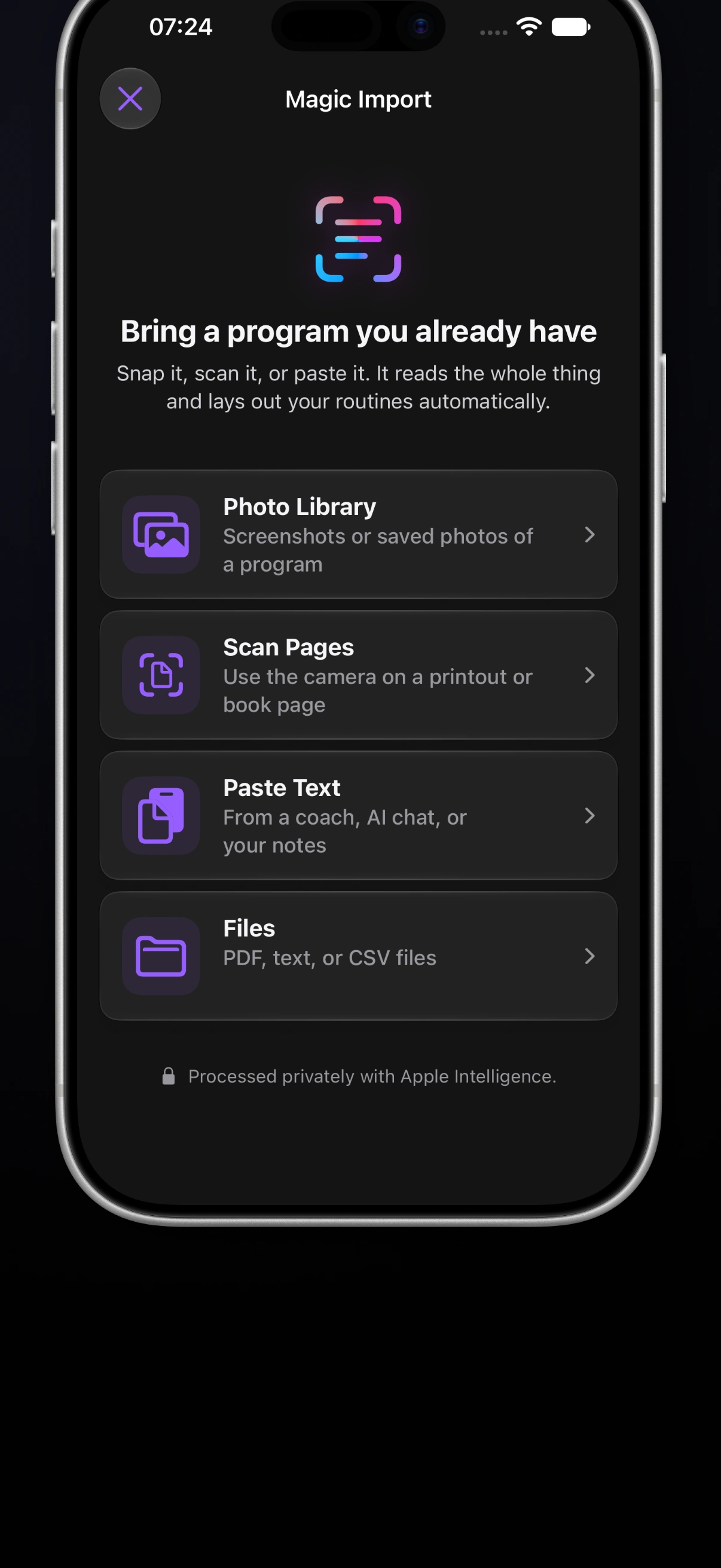 Magic Import gives each source type a clear entry point, so you can bring in the version of the program you actually have.
A simple way to import a plan
- In Steady, open the option to add a program and choose Magic Import. You can also use it while editing a program or from an empty routine.
- Choose the source that matches your plan. A clean screenshot is usually easiest for an image-based program; paste text when the plan is already in a message or note; use Files for a PDF, TXT, or CSV.
- Import the full program, then let Steady separate it into routines and add the exercises.
- Review the result before saving. Check exercise matches, sets, rep ranges, weights, rest times, and any notes that matter to how you train.
- Make the changes you need and save the program. From there, it works like any other Steady routine: you can log what you actually perform and adjust it over time.
The best source is legible and complete. For photos, use clear, well-lit pages and include all the pages that belong to the plan. For pasted text, paste it as written rather than trying to reformat it first. A single source can contain several routines; the import is designed to work out the split.
Four useful ways to use Magic Import
Turn a ChatGPT plan into a routine you can actually train
ChatGPT is useful for thinking through a training plan, but a finished answer is still often just a long block of text. When you have asked it for a program, copy the complete output—including the day names, exercise lists, sets, rep ranges, rest guidance, and notes—and choose Paste Text in Magic Import. You do not need to turn the answer into a special import file first.
Keep the structure visible when you copy it. Clear labels such as “Day 1: Upper,” “Day 2: Lower,” and separate lines for each exercise give you a better source to review than a condensed paragraph. Once Steady has laid out the routines, check that the exercise variations match your equipment and that the suggested volume, loads, and progression make sense for you. An AI-generated plan is a useful first draft; the routine you save should still reflect your experience, schedule, and recovery.
Bring the program from a previous workout app
Switching workout trackers does not mean you have to abandon the program you already know. If your previous app can export the routine as a PDF, TXT, or CSV, save that one file to Files and choose it from Magic Import. This is a practical way to bring forward the structure of a multi-day routine—rather than re-entering every exercise, set, and rest target from scratch.
Not every app exports in a supported format. If it gives you a proprietary file, a spreadsheet, a Word document, or only an on-screen view, use the version you can actually bring in: copy the routine text, save screenshots, or export a PDF if that option is available. Magic Import helps recreate editable routines, not automatically transfer an app’s full workout history, achievements, or account data. After import, review old working weights and exercise names before treating the new routine as current.
Paste a WhatsApp message from your coach or personal trainer
Many programs arrive as a WhatsApp message instead of a formal document: a weekly split in a chat, a list of substitutions after an injury, or a short update to last month’s plan. Copy the complete message or message sequence and paste it into Magic Import. Include the day labels and the coach’s notes, not only the exercise names, so you have the context needed to tell a warm-up set from a working set or an optional exercise from a required one.
If your coach sends a PDF, save it to Files and select that instead. If the plan is a photo of a handwritten or printed sheet, save the image or scan the page. Either way, the imported result is a convenient place to make the plan usable during training—but it is not a substitute for clarification. When a prescription is ambiguous, such as “go heavy” or “leave a couple in the tank,” confirm what your coach intended before you turn that interpretation into a routine target.
Rescue a plan from scattered notes and screenshots
You may also have a workable plan split between a Notes document, a few screenshots, and an old photo of a gym whiteboard. Gather the version that is most complete, then use the source that keeps its details clearest. Pasted text works well for a note; Photo Library is useful for screenshots; Scan Pages is the better fit for a printed handout.
Do not spend an hour manually combining fragments before you import. Start with the clearest full version, then use Steady’s editor to add the one or two missing details that still matter. The goal is not to preserve every outdated annotation. It is to turn a plan you can recognize into a clean routine you can follow and improve.
Review the training details, not just the exercise names
An import saves time, but it should not replace judgment. A program can contain shorthand, a machine name your gym does not use, an exercise with several close variations, or an old load that no longer fits your current strength.
Treat the first review like you would a coach handing you a printed plan: confirm the intent before you start. Pay particular attention to:
- exercises with similar names or variations
- whether a set is a warm-up or a working set
- rep ranges, duration-based work, and rest intervals
- weights that need to be converted to the equipment at your gym
- notes that change how you want to perform an exercise
Steady keeps the editor available while an import is being built, and imported routines remain editable. If something is not quite right, correct it there instead of forcing your training to match the source exactly.
 A quick review before your first session is enough to turn an existing plan into one you can use with confidence.
When importing is better than starting from scratch
Importing is most useful when the structure is already decided. Maybe your coach sent a four-day plan, you have a reliable routine buried in old notes, or you are moving from another app and want to preserve the training flow you know.
Starting from scratch may be better when the source is vague, badly outdated, or no longer reflects your goals. In that case, build a smaller, current plan rather than preserving old complexity. You can also import the useful parts, remove the rest, and keep the routine names and exercises that still earn their place.
Availability and a practical limitation
Magic Import is a Steady 3.0 feature for eligible iOS 27 devices with Apple Intelligence available. It supports photos, scanned pages, pasted text, and one PDF, TXT, or CSV file; it is not a general document importer for formats such as Word, Excel, RTF, HTML, or Markdown.
It also uses AI to interpret a source, so always review the imported program. A clean source makes the process smoother, but you remain the person who decides whether the exercise, prescription, and progression make sense for your training.
Your program should live where you can actually use it. Magic Import removes the tedious first pass; Steady gives you a focused place to refine the plan, log the work, and see what changes over time. Start with Steady when you are ready to bring your existing training into one clear routine.
Ready to start applying progressive overload?
Ditch the spreadsheets and complex notes. Join thousands of lifters who use Steady to focus on the workout, track their progress, and automatically know when to add weight.
Download Free for iPhone