How to Check Exercise Details on Apple Watch

Exercise details on Apple Watch are most useful as a quick, in-workout reference: confirm what a movement targets, what equipment it uses, or the basic sequence, then get back to training. They are not a replacement for learning a new exercise properly, nor a reason to turn a rest period into a long screen session.
That small distinction matters. You may be halfway through a routine and reach an accessory you only run occasionally. The name is familiar enough to recognize, but not enough to recall whether it calls for a cable, a machine, or a particular setup. A fast reminder is useful; leaving the workout to search, compare videos, and second-guess every cue usually is not.
Steady’s Apple Watch exercise details are designed for that narrow moment. The active workout stays on your wrist, and the reference lives one tap away when it can save you from guessing.
What exercise details show
In an active Steady workout, an exercise with available details can open a compact reference view from its name on Apple Watch. It can show:
- the primary and secondary muscles;
- the equipment used;
- a visual thumbnail when one is available;
- a short set of instructions.
Think of that information as orientation, not a coaching session. It is enough to distinguish two similarly named movements, remember what an unfamiliar accessory is meant to train, or check that the station in front of you is the one the routine calls for.
The most helpful use is usually before the first working set. Take the ten seconds to remove uncertainty, make the setup choice you can execute safely and confidently, then let the rest of the session stay simple.
Use it for a reminder, not a mid-workout rabbit hole
An exercise reference is valuable when it makes the next decision easier. It becomes less useful when it makes you restart the whole plan from your wrist.
Use the detail view when you need to answer one of these questions:
- What equipment does this planned movement use?
- Which muscles is this accessory intended to emphasize?
- What is the basic sequence before I do my warm-up set?
Then return to the workout and judge the set in context. If the station is unavailable, the movement feels wrong, or you need a substantial technique assessment, make the bigger decision on your iPhone or with a qualified coach. A small Watch screen is a good place for a prompt, not a full redesign of your training.
 A short reference check can keep the next action clear without taking over the rest period.
How to open the details in Steady
The flow is intentionally close to the work you are already doing:
- Start or open an active workout in Steady.
- On Apple Watch, look for the current exercise at the top of the workout screen.
- Tap the exercise name when it shows the disclosure arrow.
- Scan the muscles, equipment, thumbnail, and instructions you need.
- Go back to the active workout and log the set you actually perform.
The exercise name only opens this view when the active workout has an exercise detail available. That is useful feedback in itself: a missing detail should not stop the workout. Use the routine name, your prior notes, or the iPhone when the decision needs more context.
Where it helps during real training
This feature earns its place in the quieter parts of training. Imagine you are returning to a routine after a few weeks away and an accessory appears that you remember only vaguely. You can check the intended equipment and muscle focus before claiming a station. Or you are moving quickly between two cable exercises and want to make sure you selected the intended variation before recording a set.
In both cases, the goal is not to chase perfect-looking training from a tiny screen. It is to reduce the friction between the plan and the next honest set. Your logged weight, reps, rest, and effort still matter more than spending several minutes reading instructions after the session has already started.
A useful boundary for Watch references
Apple Watch exercise details work during an active Steady workout, so they are not a standalone exercise browser for planning at home. They also depend on the active exercise having a usable detail record; Steady can show a loading state and lets you retry if the detail cannot be fetched at that moment.
That boundary is sensible. Planning a routine, comparing replacements, and making major edits deserve the space of the iPhone. The Watch is there for the moments when you need a fast answer without breaking your training flow. For the broader live-workout controls, see How to Control Your Workout From Apple Watch.
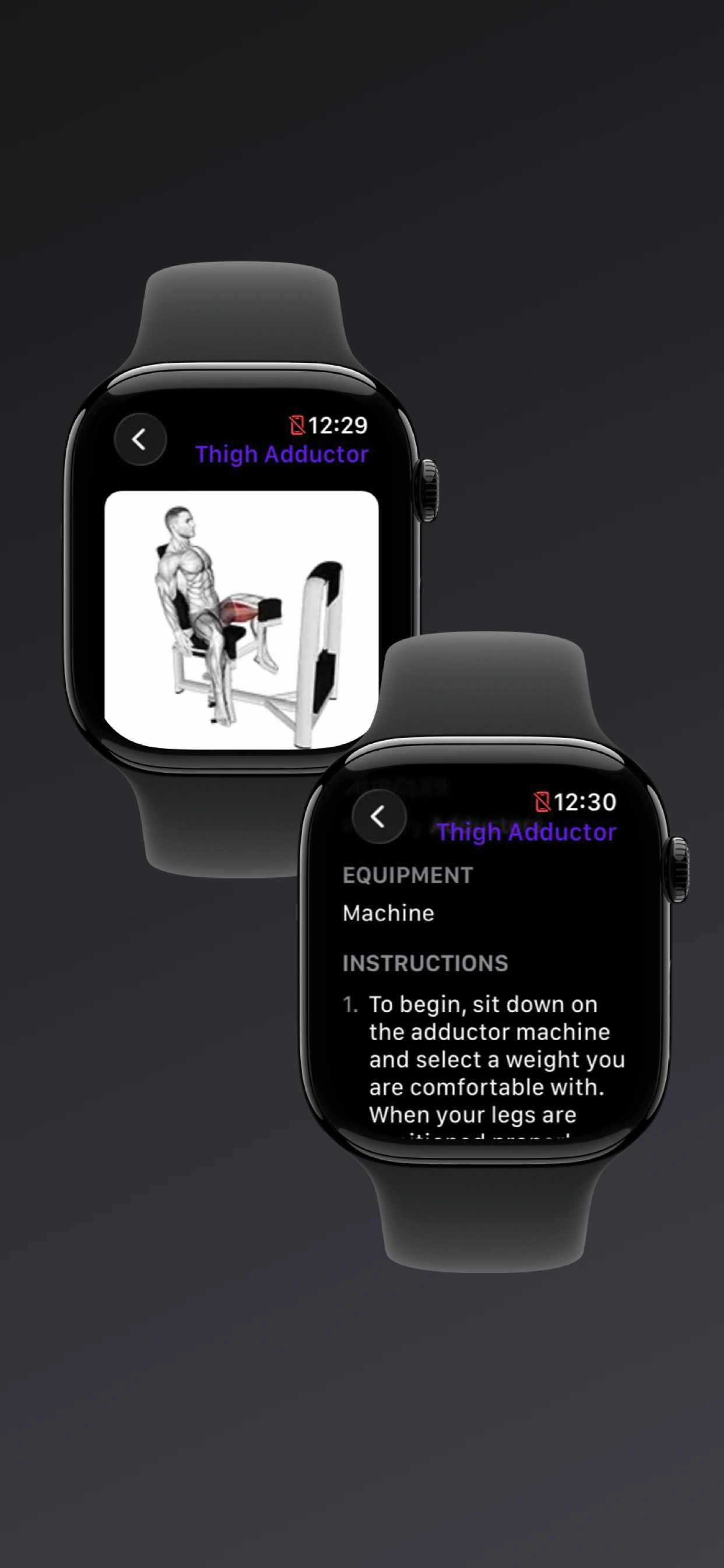 The reference is attached to the active exercise, so the useful information stays close to the set you are about to do.
Keep the reference brief and the training real
The best workout tools make the next good action easier. Use Apple Watch exercise details to clear up a small question, not to replace practice, coaching, or thoughtful program changes. Then return to the set, log what happened, and keep the workout moving.
Steady keeps those small references alongside the active workout while leaving the deeper planning and review work where it belongs: on the screen and at the time when you can give it proper attention.
Ready to start applying progressive overload?
Ditch the spreadsheets and complex notes. Join thousands of lifters who use Steady to focus on the workout, track their progress, and automatically know when to add weight.
Download Free for iPhone