Customize Your Exercise Library for Your Gym
The quickest way to make an exercise library useful is to make it look more like your real training space. Hide equipment you never have access to, keep the options you can actually use, and leave enough room to find a sensible substitute when the gym is busy. A shorter, accurate library makes exercise selection faster without making your training less flexible.
An exercise library should support the workout in front of you—not make you scroll past cable machines, specialty bars, and equipment your gym does not own. That is especially useful in a home gym, a hotel gym, a small apartment gym, or any commercial gym with a predictable setup.
What does it mean to customize an exercise library?
Customizing an exercise library means changing which equipment categories appear while you browse for exercises. It is not the same as deleting exercises or rewriting your routines. The goal is simply to remove options that are not practical for your current gym, so the choices you see are more relevant.
For example, if you train at a small gym with dumbbells, benches, cables, and a rack—but no kettlebells or Smith machine—you can reduce the library to the equipment that is actually available. You still get variety; you just stop spending attention on dead ends.
Start with the equipment you can use most weeks
Do not build your library around the best-equipped gym you occasionally visit. Start with the place where you do most of your training.
Make a quick mental list:
- Equipment that is reliably available: dumbbells, barbells, cables, machines, benches, or bodyweight space.
- Equipment that is occasionally available but often busy.
- Equipment you do not have at all.
The first group should shape your default library. The second can stay visible when it is part of your normal plan. The third is the best candidate to hide. This keeps a cable-free home-gym session from turning into a search through exercises you cannot perform.
Your default exercise choices should reflect the equipment you can reliably reach, not an imaginary perfect gym.
Do not confuse fewer options with fewer good options
A focused library is not a license to repeat the same movement forever. It is a way to surface realistic choices first.
Keep enough equipment categories visible to cover the movement patterns you use: a press, a pull, a squat or knee-dominant movement, a hinge, and any accessories that matter to you. If a cable station is usually busy but sometimes available, leaving cable exercises visible can still make sense. The question is whether the category gives you viable choices often enough to be worth the friction.
When a specific exercise is taken, use a planned alternative rather than randomly choosing the next item in the list. Our guide to planning exercise substitutions can help you decide those backups before the workout begins.
How to set equipment preferences in Steady
Steady lets you tailor the exercise library by equipment type. Go to Settings → Exercises, open Equipment, then choose an equipment type and turn off Show in Exercise Library. Exercises using that equipment are hidden from the library.
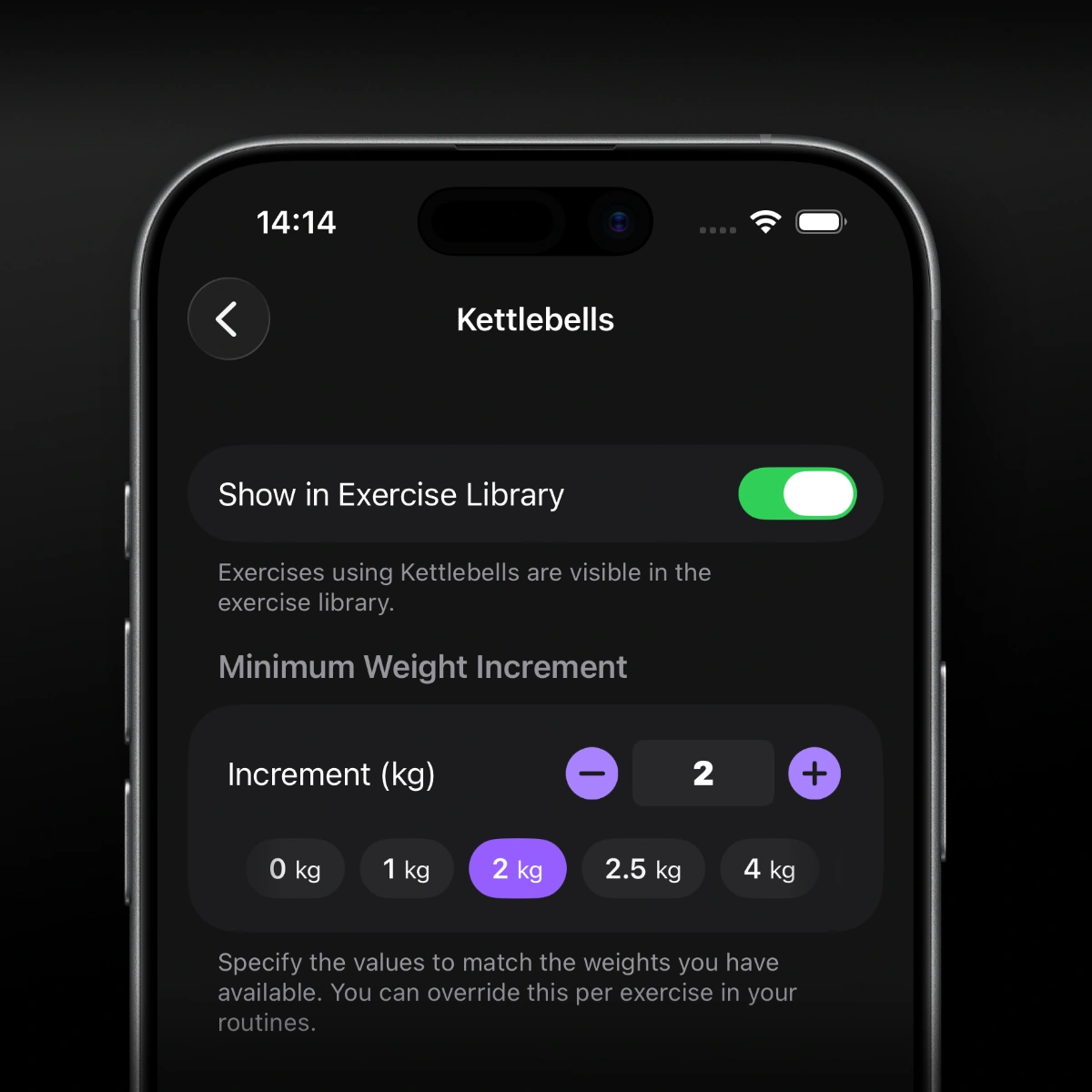
The same equipment screen also lets you set the smallest weight jump you have available for supported equipment types.
This is a preference, not a destructive edit. Hidden equipment stays available in your saved routines and workout history, so a past session does not lose context just because you changed where you train. You can also turn a category back on whenever your equipment access changes.
There is one important limitation: hiding equipment is a Steady Pro feature. Anyone can restore a hidden category, but hiding a category requires Pro. Treat it as a useful cleanup tool, not a requirement for building a good routine.
Use preferences alongside alternatives, not instead of them
Equipment preferences solve the broad problem: they make the library match your gym. Alternatives solve the specific problem: what should replace this exercise today?
That distinction matters. You might hide kettlebells permanently because your gym has none, while keeping cable exercises visible even though the cable station is sometimes occupied. For a cable movement you use often, save or plan a dumbbell or machine alternative. In Steady, suggested alternatives also respect disabled equipment preferences, helping the list stay realistic for your setup.
See how to use exercise variations for a practical way to keep substitutions purposeful rather than random.
Revisit your library when your training environment changes
Update your preferences when you move gyms, build out a home setup, start training while traveling, or gain access to new equipment. You do not need to tune the library every week. Review it when the available tools change enough that your usual choices no longer fit.
The best exercise library is not the biggest one. It is the one that helps you choose a good movement quickly, log it clearly, and keep training. Steady keeps that process focused: set the library around your real equipment, use alternatives when the floor gets busy, and let your workout history stay intact as your setup evolves.
Ready to start applying progressive overload?
Ditch the spreadsheets and complex notes. Join thousands of lifters who use Steady to focus on the workout, track their progress, and automatically know when to add weight.
Download Free for iPhone