Best Workout App for Custom Routines
The best workout app for custom routines is a flexible strength-training log that lets you build your program exactly as written, change it without friction, and use your history to decide what comes next. If you already know your split, exercises, and progression method, you do not need another library of plans competing for your attention. You need a tracker that respects your programming.
That distinction matters. Many fitness apps are built to sell or recommend workouts. A custom-routine app has a different job: turn your plan into a repeatable training workflow without flattening every exercise into the same sets, reps, and rest time.
Workout planner or workout tracker: which do you need?
A workout planner helps decide what you should do. A workout tracker records what you planned, what you performed, and how that performance changes over time.
Some apps described as planners are closer to a workout plan store. They ask you to choose from a shelf of fixed, prebuilt programs with names like “Summer Warrior,” “Strength Explosion,” or “Massive Arms.” That can be convenient when one happens to fit, but it leaves little room for your experience, schedule, available equipment, preferred split, or the muscles you actually want to prioritize.
There is overlap, but the starting point is different:
- Choose a prebuilt plan if you are happy to follow its fixed structure as written.
- Choose a custom workout tracker if you already have a program—or enjoy writing your own.
- Choose a personalized generator if you want the app to build a sound starting plan around your goals, experience, schedule, equipment, and preferences.
The important distinction is choice. A strong app should let you bring your own program or create one around the person who will actually perform it—not force you to pick the least-wrong title from a catalog.
What the best custom-routine apps get right
1. Your actual split fits without workarounds
You should be able to create a full-body plan, upper/lower split, push-pull-legs rotation, or something completely personal without renaming generic templates or deleting unwanted exercises every week.
The routine builder should make the basics easy:
- add and reorder exercises
- set working sets, rep ranges, and rest intervals
- create custom exercises when the library does not match your gym
- duplicate a routine when two days share the same structure
- organize multiple routines as one program
If the app only works well when you follow its preferred structure, it is not really supporting custom routines.
2. Targets can be precise when your program is precise
“Three sets of 10” is not enough for every training method. A top set plus back-off sets, ramping sets, AMRAP finishers, and different targets for each set all need more flexibility.
A good custom workout app should support simple uniform targets when that is all you need, while allowing per-set targets when the program calls for them. It should not force advanced detail into every exercise—but it should not erase that detail either.
If you use different loads or reps across a movement, see per-set targets vs uniform targets for a practical comparison.
 Your program should remain the source of truth, whether it starts in a notebook or inside the app.
3. Small changes do not require rebuilding the week
Real programs change. A machine is occupied, an exercise irritates your shoulder, or you decide a movement belongs earlier in the session. The best tracker lets you make that adjustment and keep training.
Look for easy exercise substitutions, in-workout reordering, editable targets, and a clear choice between making a one-session change or updating the routine. Flexibility is not the same as randomness; it is what keeps the plan usable when the gym does not cooperate.
4. History helps you run your progression method
Custom programming only works when you can compare sessions. At minimum, the app should show the last weight and reps for the same exercise. Better still, it should make exercise history, trends, personal records, and notes easy to review without leaving the workout flow.
The app does not have to make every progression decision for you. It does need to preserve the evidence you use to make those decisions. That is why a dedicated tracker is usually more useful than a generic notes app once your training becomes consistent.
5. The app stays focused on your training
Lifters who write their own routines rarely need a home screen dominated by a workout store, creator feed, challenges, or hundreds of plans they never intend to run.
Those features are not automatically bad. They are simply solving a different problem. If your program is already decided, the faster route is usually:
- Open your routine.
- See what you did last time.
- Log the next set.
- Review the session when you finish.
Everything between those steps should earn its place.
A five-minute test before choosing an app
Do not judge a custom-routine app from its App Store screenshots. Build one real training day and check whether the workflow survives contact with your program.
Use this test:
- Add your most complicated exercise. Use the one with a rep range, top set, back-off sets, or unusual equipment.
- Change one exercise. See whether you can substitute or reorder it without rebuilding the routine.
- Log a sample session. Count how many taps it takes to enter weight and reps.
- Find the previous performance. It should be visible when you need it, not buried in a separate analytics maze.
- Edit the plan for next time. Confirm that the app distinguishes what you performed from what you want to target next.
If those five actions feel natural, the app probably understands self-directed training. If they feel like edge cases, it probably does not.
How custom programming fits in Steady
Steady gives you both routes. You can build custom routines from scratch and organize them into programs, then set exercise targets that match how you train. Or, if you want help with the programming, Steady can create a personalized plan from your experience level, goal, weekly training frequency, available equipment, training emphasis, and preferred split.
That generated plan is not just a catchy title wrapped around a fixed list. It keeps the fundamentals of a well-built, evidence-informed strength program in view: appropriate exercise selection and volume for your experience, balanced muscle distribution, deliberate exercise order, set counts and rep ranges, warm-up work, and rest intervals. You still receive a complete starting structure, and you can customize it instead of being locked into it.
Whether you build the plan or Steady creates the starting point, targets can stay uniform across sets or vary set by set. That works for everything from straightforward double progression to top-set and back-off structures.
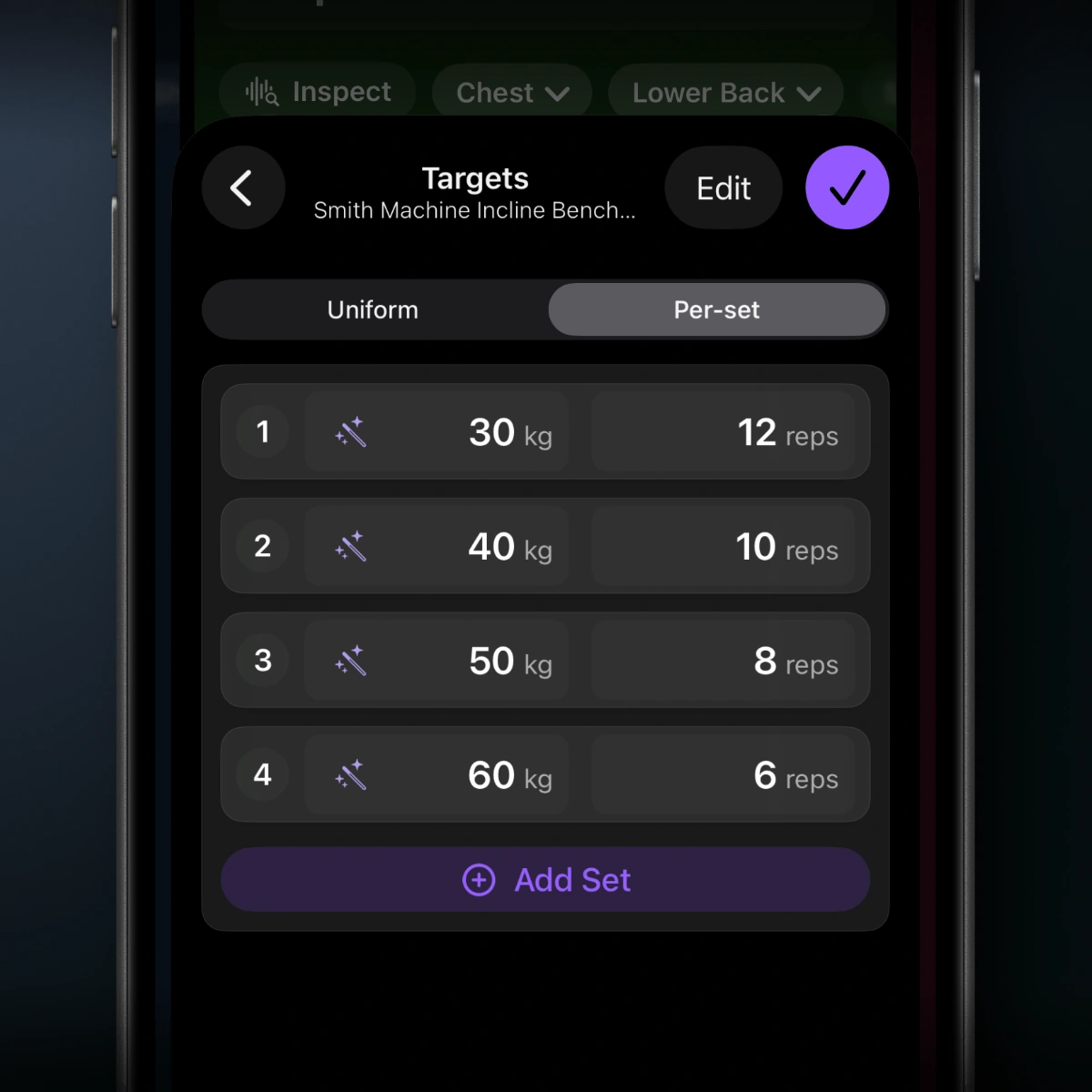 Per-set targets preserve the details of a custom program instead of forcing every set into one prescription.
After a workout, you can repeat the session or save it as a new routine. You can also choose how future targets behave: keep the routine unchanged, repeat your last performance, or use Smart Progression as a Pro option. That makes Steady useful whether you want full manual control or help turning completed sets into the next target.
The interface is deliberately focused: no social feed and no requirement to choose between “Summer Warrior” and “Massive Arms” before you can begin. Start from your own routine or let Steady create a structured plan around you, then change it whenever your training needs change. If you want to understand the fundamentals yourself, start with how to build a 3-day gym routine.
When a custom-routine tracker is not the best choice
A self-directed tracker may be the wrong tool if you want follow-along video classes, live coaching, or an app that makes every programming decision. Complete beginners who do not yet know how to choose exercises or manage weekly volume may benefit from a guided plan first.
But once you have a routine you trust, control becomes more valuable than content volume. You should not have to fight the app to keep running your own program.
The bottom line
The best workout app for custom routines should preserve your structure, handle precise targets, make changes painless, and keep your training history useful. It should feel like the operational layer for your program—not a replacement for it.
That is the role Steady is built to fill: a focused workout tracker for lifters who want their own routines, their own progression decisions, and a cleaner path from plan to completed set. Try Steady and build the routine you actually want to run.
Ready to start applying progressive overload?
Ditch the spreadsheets and complex notes. Join thousands of lifters who use Steady to focus on the workout, track their progress, and automatically know when to add weight.
Download Free for iPhone