How to Track Timed Strength Sets
Track a timed strength set by recording the seconds you actually completed, the exercise variation, and any load or assistance that changes its difficulty. Keep rest periods and your start-and-stop rule consistent. Compare individual sets before adding their durations together.
A log that says “three holds” leaves out most of the useful information. A log that says 35 s, 32 s, 28 s gives you something concrete to compare next time. The important part is knowing what those seconds represent.
When seconds belong in your workout log
Duration is useful when the exercise prescription asks you to sustain a task for time. Static holds, such as planks, wall sits, and hangs, are familiar examples. Loaded holds can also use time alongside a clear record of the external load.
That differs from rep tempo, which describes the timing of phases within each repetition. Ten reps with a controlled lowering phase still belong in a rep-based log. You do not need to replace them with an estimate of total seconds.
For a timed task, decide what ends the recorded effort before starting: reaching the prescribed duration, ending the hold, or losing the position your program requires. Use the same rule in later sessions. The timer cannot decide whether the task stayed consistent.
Record the result beside the target
Suppose your existing workout calls for three 40-second holds. Here is an example record, not a prescription:
| Set | Target | Completed | Context |
|---|---|---|---|
| 1 | 40 s | 40 s | Same variation as last session |
| 2 | 40 s | 36 s | Ended before the target |
| 3 | 40 s | 31 s | Same planned rest between sets |
The completed total is 107 seconds. The planned total was 120. Keep the result honest rather than copying the target into every row.
Record only the context needed to make the next comparison fair: variation, added load or assistance, rest, and whether the effort was continuous. For a one-sided task, make the side explicit. “30 seconds each side” and “30 seconds combined” describe different work.
 A useful log preserves each set’s result and the few conditions that explain it.
A pause changes what the number means
If you hold for 20 seconds, rest briefly, and hold for another 20, you accumulated 40 seconds of work across two bouts. You did not complete one uninterrupted 40-second hold. Preserve that distinction, even if your timer lets you pause and resume.
Research gives a reason to take the pattern seriously. A laboratory study in 14 young men compared continuous and intermittent quadriceps contractions with matched force-time totals across equal activity periods. The continuous protocol produced greater losses in strength and voluntary activation. This was an acute fatigue experiment with different contraction intensities, not a test of which gym routine builds more muscle. It shows why a total alone can hide meaningful differences.
Keep work time separate from the rest timer, too. Time spent getting into position, adjusting equipment, or recovering between bouts should not silently inflate a continuous-hold record.
Read progress without chasing longer sets forever
Compare the same task under similar conditions first. If 40, 36, 31 becomes 40, 39, 35 with the same variation and rest, you sustained more work across those sets. That is a useful performance improvement; it does not measure muscle growth directly.
Other changes need a different interpretation:
- A harder variation with fewer seconds: establish a new baseline rather than treating the shorter time as regression.
- Longer rest with a better final set: the result may reflect the extra recovery. Keep that context visible.
- An additional set: more total seconds partly reflects more work being attempted.
- An interruption: record the separate bouts or explain the break instead of calling it a continuous best.
Use the duration range and progression rule already in your program. Reaching its upper target does not require turning every hold into an endurance test. If you change load, variation, or time, change one main variable at a time so the next result remains interpretable.
Recording timed sets in Steady
For exercises configured around duration, Steady shows an inline stopwatch with play and pause controls during the active set. It displays elapsed time beside the target; completing the set captures the elapsed duration. You can also tap the duration field to enter a time manually.
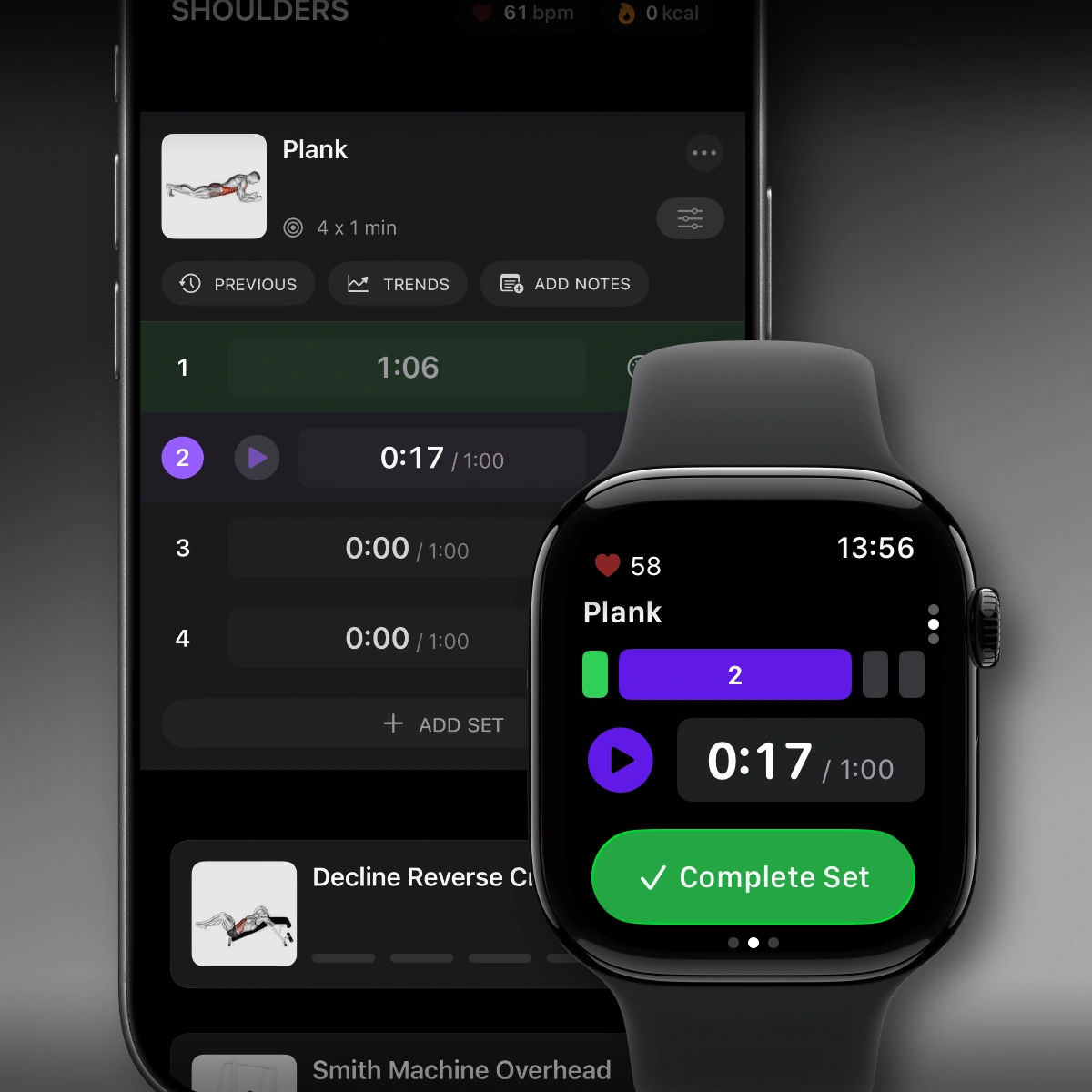 The timed-set display separates elapsed seconds from the target. This release screenshot illustrates the controls introduced in Steady 2.6.
Use the controls to record the task you performed. A pause button can exclude setup time, but it cannot make an interrupted effort equivalent to an uninterrupted one. If you forgot to start the timer, enter a duration you actually know; avoid inventing a precise result from a vague memory.
Make the next comparison useful
Before leaving a timed exercise, check three things: the completed seconds are accurate, interruptions are clear, and the variation is identifiable. That is enough detail to make the next session easier to judge.
For the wider picture, our guide to tracking bodyweight exercises covers reps, added load, and assistance. Log the work in Steady, keep the conditions clear, and let the next comparable session show what changed.
Ready to start applying progressive overload?
Ditch the spreadsheets and complex notes. Join thousands of lifters who use Steady to focus on the workout, track their progress, and automatically know when to add weight.
Download Free for iPhone