Should You Delete Bad Workouts From Your Log?

Do not delete a bad workout from your log just because it was bad. Keep sessions that reflect what really happened, and edit only genuine recording mistakes. A difficult workout—missed reps, lower loads, a rushed finish, or a shorter session—is useful context for your next decision. Deleting it can make your history look cleaner while making it less true.
It is tempting to erase a session that did not go to plan. Maybe your usual weight felt unusually heavy, the gym was packed, or you stopped early after a rough day. But a training log is not a highlight reel. It is a record that helps you tell the difference between one off day and a pattern worth changing.
The practical rule is simple: correct facts; keep feedback.
Keep the workout when the performance was real
A bad session still belongs in your history when the numbers accurately describe the work you did. That includes workouts where you:
- missed a planned rep or used less weight than usual;
- stopped an exercise because the setup felt wrong or you were unusually fatigued;
- shortened the session because of time, recovery, or a crowded gym; or
- changed an exercise and logged the replacement you actually performed.
Those entries answer useful questions later. Did the dip happen once or across three comparable sessions? Did it follow poor sleep, travel, a heavier week, or a change in equipment? Did your performance rebound next time? You cannot answer those questions from a log that contains only your best days.
One imperfect workout does not mean you lost progress. It is one data point. Several similar workouts can be a signal to look at recovery, targets, or the program. That distinction is much easier to see when the record is honest.
Edit a mistake instead of preserving bad data
Editing is the right call when the entry does not describe the session you actually performed. A mistyped weight, an accidental extra set, the wrong exercise, or an incorrect workout time is not useful feedback—it is noise.
Good reasons to edit a completed workout include:
- You entered 102.5 kg when you lifted 120.5 kg.
- You marked a set complete before doing it.
- You logged a cable row but actually used a chest-supported row.
- You forgot to record a completed working set and can remember it accurately.
Be conservative with memory. Correct a clear factual error, but do not turn an uncertain session into a polished guess two days later. If you cannot remember whether the final set was eight or nine reps, the safer choice is usually to leave the record alone and treat the next session as a fresh comparison.
 A useful log is not the most flattering version of the session—it is the version you can trust next week.
Delete only sessions that should not exist
Deletion is for a workout that is not a real part of your training history: a test session created by accident, a duplicate, or a workout you started and abandoned before doing meaningful training.
That is different from deleting a session because you are disappointed with it. A brief workout can still show how you responded to a busy day. A missed target can still show that the target, recovery, or setup needs attention. An honest record lets you make a calmer adjustment instead of overreacting to the feeling of one bad day.
If a session includes pain, dizziness, or unusual symptoms, the priority is not rescuing the log. Stop the activity and seek appropriate professional care. Keep only the information that may help you describe what happened; do not use a training app to diagnose a health problem.
Read the context before judging the result
Before you call a logged workout evidence of a problem, compare like with like. The same exercise, similar equipment, rep range, rest, and role in the session make a meaningful comparison. A heavy first lift after a good night of sleep is not directly comparable with a late accessory after a rushed workday.
Use a short review after an off session:
- Check what changed: sleep, food, schedule, rest, stress, equipment, or exercise order.
- Compare the next one or two similar workouts rather than changing everything immediately.
- Hold the load, reduce one small variable, or progress normally based on the pattern.
- Add a brief note only when it makes the next comparison clearer.
This is also why it helps to log missed reps. The result tells you what happened; a little context tells you what it means. Neither needs to become a long journal entry.
How to correct history in Steady
Steady lets you edit a completed workout from the History tab, so a wrong weight, rep count, exercise, or session detail does not have to stay in your record. The editing view keeps warm-up sets separate from working sets, which makes it easier to correct a factual error without turning preparation into training volume.
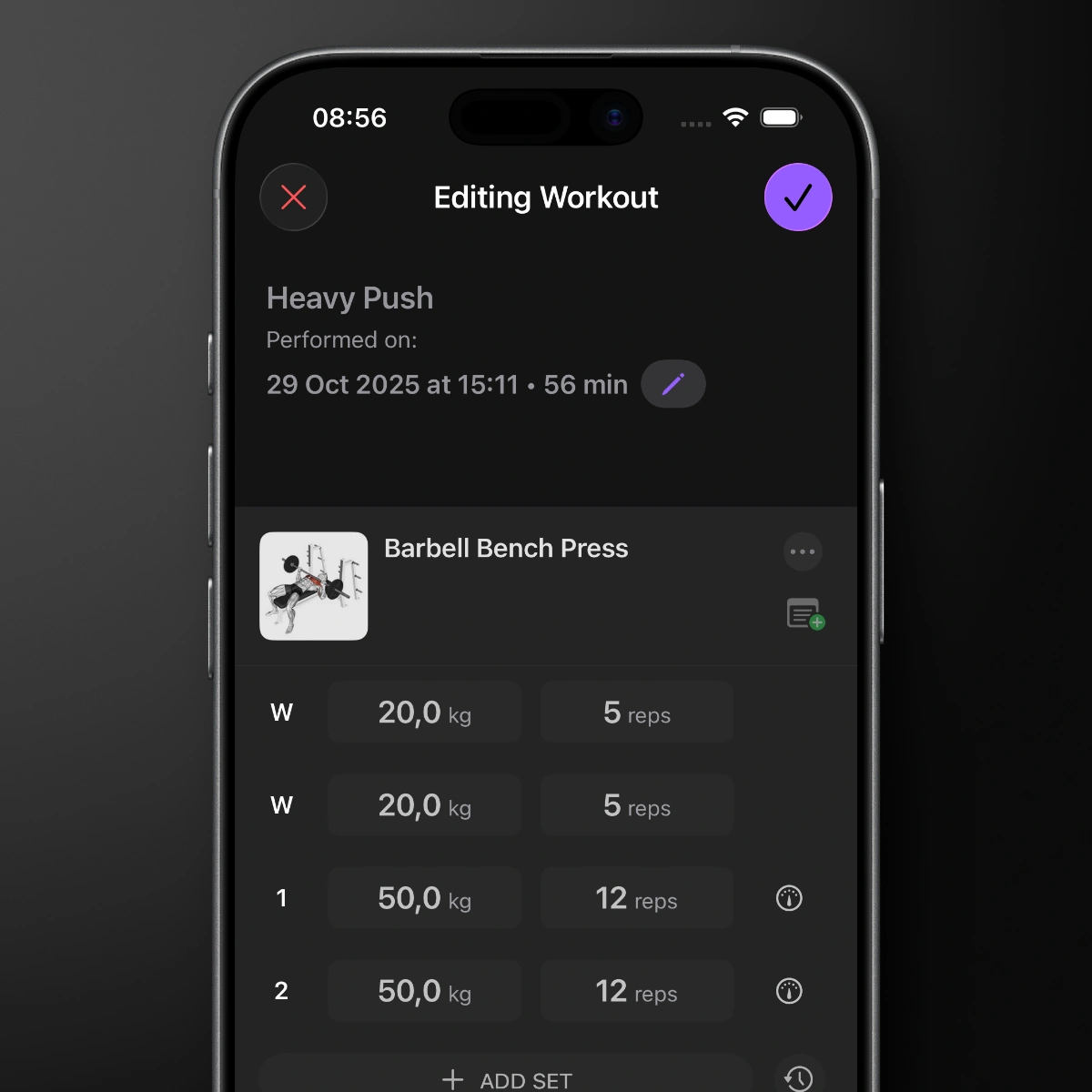 Use editing to correct what happened, not to hide how the session felt.
Steady also offers Delete Workout for sessions that truly should not exist. That action is irreversible, so it is worth pausing before using it. If the workout was simply imperfect but real, keeping it is normally the better choice for your future self.
The bottom line
Keep bad workouts when they are honest. Edit them when a detail is clearly wrong. Delete them only when the session does not belong in your history at all.
That approach makes your log less curated and more useful. Over time, Steady gives you a focused record of the training you actually did—good sessions, rough sessions, and the patterns that help you make the next workout smarter. Start tracking with Steady.
Ready to start applying progressive overload?
Ditch the spreadsheets and complex notes. Join thousands of lifters who use Steady to focus on the workout, track their progress, and automatically know when to add weight.
Download Free for iPhone